
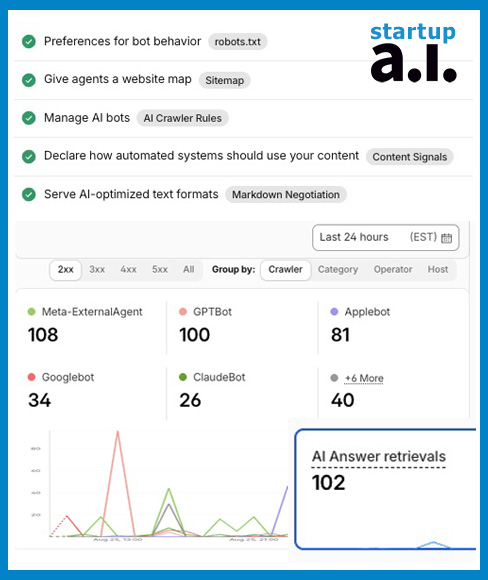
Generative Engine Optimization (GEP)
for WordPress self-hosted sites with domain proxy via Cloudflare
Generative Engine Optimization (GEP) optimizes content specifically for AI answer engines (ChatGPT, Perplexity, Claude, Gemini) and Retrieval-Augmented Generation (RAG) models, rather than traditional keyword-matching search algorithms.
llms.txt and llms-full.txt as the AI Context Roadmap
- Context Window Efficiency: AI crawlers ingest content to train models or feed real-time RAG pipelines. Standard HTML pages contain heavy layout code, navigation scripts, and styling tags that consume LLM token limits.
- Structured Clinical Copy: llms.txt files serve a clean, Markdown-formatted manifest that isolate core definitions, treatment protocols, pricing structures, case studies and other relevant website content. This allows AI search engines to parse, cite, and recommend your exact clinical terminology without formatting noise.
robots.txt as the GEP Traffic Controller
- Headless Rendering Support: Unlike legacy search crawlers that only read raw HTML text, LLM crawlers render fully visual DOM states to understand page layout and context. Blocking CSS or JS in robots.txt causes AI rendering engines to parse broken content hierarchy.
- Crawl Budget Protection: AI crawlers have strict request quotas per domain. Disallowing non-essential paths (such as oEmbed endpoints, site searches, and dynamic utility scripts) ensures 100% of an AI bot’s crawl allocation is spent ingesting high-value clinical and service pages.
Note: I create my .txt files manually. Below you will find plugins listed for that purpose. Also, any mention of llms.txt, repeat for llms-full.txt. Create your llm files with your favorite Ai.
Implementation Checklist
-
Install & Configure Dynamic Markdown Rendering Engine
- Plugin Activation: Install a dedicated Markdown delivery plugin (such as Serve Markdown or FoundByAI) to dynamically convert WordPress pages into raw Markdown without creating static files on your server.
- Configure Target Endpoints: Set the plugin to intercept requests for core clinical service pages, protocol guides, qualification templates, enabling both header-based (Accept: text/markdown) and extension-based (.md) requests.
-
Realign WordPress Canonical Routing
- Flush Permalinks: Navigate to Settings → Permalinks in WordPress Admin and click Save Changes. This forces WordPress to write the plugin’s custom .md rewrite rules into memory.
- Bypass Canonical Redirects: If WordPress’s canonical engine continues forcing 301 redirects from .md requests back to standard HTML slashes, add a filter in your theme’s functions.php file to disable redirect_canonical for requests ending in .md.
-
Configure Rank Math llms.txt for Generative Engine Optimization (GEP)
- Activate LLMS Txt Module: Navigate to Rank Math SEO → Dashboard and toggle the LLMS Txt module On.
- Select High-Value Post Types: Under Rank Math SEO → General Settings → Edit llms.txt, select primary clinical service pages, autonomic recalibration guides, and treatment pricing structures.
- Publish Markdown Index: Save changes so the root-level llms.txt index generates dynamically as an explicit roadmap for AI crawlers (ChatGPT, Claude, Perplexity).
-
Optimize robots.txt for AI Rendering & Crawl Efficiency
- Access File Editor: Go to Rank Math SEO → General Settings → Edit robots.txt.
- Allow Theme & Plugin Rendering Assets: Explicitly allow /wp-content/themes/*.css, /wp-content/plugins/*.js, and media upload directories. Headless AI crawlers require CSS and JavaScript to render the Document Object Model (DOM) and extract clinical Schema markup accurately.
- Block High-Frequency Waste Endpoints: Disallow /wp-json/oembed/, /?s=, /search/, and preview parameters to prevent bots from exhausting your crawl budget on non-indexable routes.
- Link Key Index Files: Add directives pointing directly to your primary XML sitemap index and your llms.txt file at the bottom of the ruleset.
-
Configure Cloudflare Account for AI Crawlers
- Check AI Bot Access: Log into Cloudflare, YourDomain,navigate to Security → Bots, and ensure Block AI Scrapers and Crawlers is toggled Off.
- Set Up Edge Cache Rules: Go to Caching → Cache Rules and create a rule to bypass edge caching when the HTTP request header contains Accept: text/markdown. This prevents Cloudflare from serving cached HTML to AI bots requesting Markdown.
-
Verify & Audit Markdown Delivery
- Test Root Endpoint: Open terminal and run:
curl -i -H ‘Accept: text/markdown’ ‘https://<your-domain>/’
Verify the response returns HTTP 200 OK and a Content-Type: text/markdown or text/plain header. - Test Inner Service Pages: Run curl against an individual service page slug using the Accept: text/markdown header to confirm it returns plain Markdown text without a 301 redirect loop.
curl -i -H ‘Accept: text/markdown’ ‘https://<your-domain>/<page>/’
-
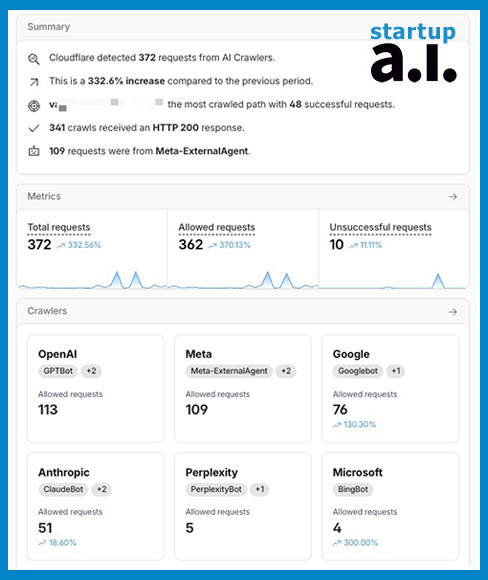
GEP Verification: Cloudflare Bot Analytics
- Access the Bot Dashboard: Log in to Cloudflare and navigate to Security → Events (or Analytics & Logs → Bots). This provides real-time visibility into every automated request hitting your server.
- Filter by Key AI Crawlers: Apply User-Agent filters to isolate generative search engine bots:
- GPTBot and ChatGPT-User (OpenAI)
- ClaudeBot and Claude-Web (Anthropic)
- PerplexityBot (Perplexity AI)
- Bytespider (ByteDance)
- Audit Response Status Codes:
- 200 OK on /llms.txt and service slugs: Confirms AI models are successfully ingesting your structured clinical Markdown content.
- 301 / 302 Redirects: Indicates crawlers are getting caught in canonical trailing-slash loops or legacy domain chains. Update all links inside your llms.txt file to match explicit, direct canonical URLs.
- 403 Forbidden: Indicates Cloudflare WAF or Bot Management rules are blocking the crawler. Check Security → WAF to ensure no firewall rules are catching these user agents.
- Track Path Velocity & Depth: Verify that bots are moving beyond CSS/JS assets and actively requesting your highest-value clinical pages—specifically your Triple Vagal Method™ (TVM) protocol containers, Letter of Medical Necessity (LMN) / HSA guides, and autonomic regulation frameworks.
- Action Trigger for Zero Crawls: If AI bots show 0 hits on /llms.txt after 48 hours, submit https://<your-domain>/llms.txt manually through Bing Webmaster Tools (which feeds Copilot and ChatGPT search) and re-index via Google Search Console.
- Check back often to detect errors, this is changing very fast.